

《零基礎入門學習Python》第062講:論一隻爬蟲的自我修養10:安裝Scrapy
這節課我們來談談Scrapy
說到Python爬蟲,大牛們都會不約而同地提起Scrapy。因為Scrapy是一個為了爬取網站數據,提取結構性數據而編寫的應用框架。可以應用在包括數據挖掘,信息處理或存儲歷史數據等一系列的程序中。
Scrapy最初是為了頁面抓取(更確切來說, 網絡抓取)所設計的,也可以應用在獲取API所返回的數據(例如Amazon Associates Web Services)或者通用的網絡爬蟲。
這節課主要講解如何安裝 Scrapy
- 使用的電腦系統:Windows 10 64位
- 使用的Python的版本:python 3.5.2
step1:安裝Python 3.5.2
直接下載安裝包安裝即可,在安裝時,必須勾選
Add Python 3.5 to PATH,這是將python添加到PATH環境變量。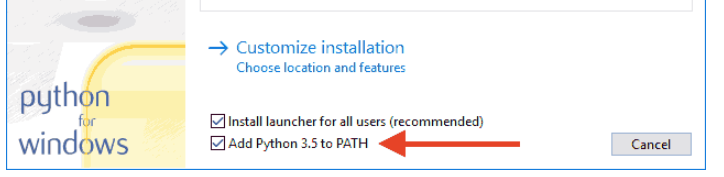
如果在安裝時沒有勾選,也沒關係,打開“運行”,輸入cmd。執行以下命令,設置環境變量:
C:\Python35\python.exe C:\Python35\tools\Scripts\win_add2path.py
step2 :確認Python 安裝正確
重新打開cmd,輸入命令“python --version”
–如果有顯示Python2.7.9則說明成功;
–如果沒有,請服用Windows特效藥:重啟系統嘗試一下。
step3:安裝pywin32(32位版本)
這裡有兩種辦法安裝:
法1:進入網頁http://sourceforge.net/projects/pywin32/,下載pywin32,雙擊安裝。

法2:打開cmd,輸入命令 pip install pywin32 ,等待安裝成功即可。
如果不能成功的話,可能就是沒有安裝pip(如果你是使用Python2.9 以前的版本,是需要自己另外安裝pip的,步驟如下:)
下面的內容針對沒有pip的用戶,其他的人可以直接看step4。
•安裝pip,地址:a)下載get-pip.pyb)進入cmd,執行:python get-pip.pyc)檢查Python27\Scripts中是否有pip.exe並設置Python27\Scripts到環境變量中d)重啟cmd,輸入命令“pip --version”•如果有顯示版本號則說明成功;•如果沒有,請繼續服用Windows特效藥:重啟系統嘗試一下。
step4:安裝lxml
這裡也可以使用兩種辦法安裝:
法2:打開cmd,輸入命令 pip install lxml ,等待安裝成功即可。
step5:安裝OpenSSL
法2:pip install pyOpenSSL
step6:安裝Scrapy
pip install Scrapy
這樣就安裝OK了,我們班來驗證一下:
重新打開cmd,輸入命令 Scrapy
C:\Users\XiangyangDai>Scrapy
:0: UserWarning: You do not have a working installation of the service_identity module: 'cannot import name 'opentype''. Please install it from <https://pypi.python.org/pypi /service_identity> and make sure all of its dependencies are satisfied. Without the service_identity module, Twisted can perform only rudimentary TLS client hostname verification. Many valid certificate/hostname mappings may be rejected.
Scrapy 1.5.1 - no active projectUsage:
scrapy <command> [options] [args]Available commands:
bench Run quick benchmark test
fetch Fetch a URL using the Scrapy downloader
genspider Generate new spider using pre-defined templates
runspider Run a self-contained spider (without creating a project)
settings Get settings values
shell Interactive scraping console
startproject Create new project
version Print Scrapy version
view Open URL in browser, as seen by Scrapy[ more ] More commands available when run from project directoryUse "scrapy <command> -h" to see more info about a command
沒問題了,但是這裡出現了一個warning,說的是 service_identity模塊裡的opentype用不了,這就尷尬了,我們嘗試重新安裝service_identity試一下:
先卸載 service_identity
輸入:pip uninstall service_identity
等待卸載完成,再安裝 service_identity
輸入:pip install service_identity
再來驗證一下:輸入Scrapy
完美了。


0 留言:
發佈留言