

當敵我兩機發生碰撞時,兩方應該是玉石俱焚的,現在我為每一個類增加撞擊時發生的慘烈畫面,比如:
敵人1:
 敵人2:
敵人2:
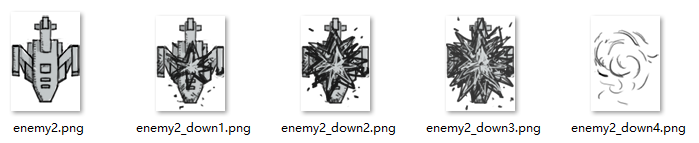 敵人3:
敵人3:
 我:
我:
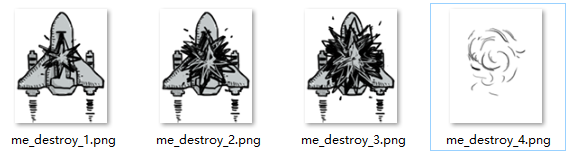 我們現在就來寫代碼:
首先為每一個類把這些圖片加進去:
我們現在就來寫代碼:
首先為每一個類把這些圖片加進去:
-
#myplane.py 部分代码
-
import pygame
-
-
class Myplane(pygame.sprite.Sprite):
-
def __init__(self, bg_size):
-
pygame.sprite.Sprite.__init__(self)
-
-
self.image1 = pygame.image.load("images/me1.png").convert_alpha()
-
self.image2 = pygame.image.load("images/me2.png").convert_alpha()
-
#添加坠机图片
-
self.destroy_images = []
-
self.destroy_images.extend([\
-
pygame.image.load("images/me_destroy_1.png").convert_alpha(), \
-
pygame.image.load("images/me_destroy_2.png").convert_alpha(), \
-
pygame.image.load("images/me_destroy_3.png").convert_alpha(), \
-
pygame.image.load("images/me_destroy_4.png").convert_alpha() \
-
])
-
self.rect = self.image1.get_rect()
-
self.width, self.height = bg_size[0], bg_size[1]
-
self.rect.left, self.rect.top = \
-
(self.width - self.rect.width) // 2, \
-
self.height - self.rect.height - 60 #减60,留给状态栏
-
self.speed = 10
-
#enemy.py
-
import pygame
-
from random import *
-
-
class SmallEnemy(pygame.sprite.Sprite):
-
def __init__(self, bg_size):
-
pygame.sprite.Sprite.__init__(self)
-
-
self.image = pygame.image.load("images/enemy1.png").convert_alpha()
-
#添加坠机图片
-
self.destroy_images = []
-
self.destroy_images.extend([\
-
pygame.image.load("images/enemy1_down1.png").convert_alpha(), \
-
pygame.image.load("images/enemy1_down2.png").convert_alpha(), \
-
pygame.image.load("images/enemy1_down3.png").convert_alpha(), \
-
pygame.image.load("images/enemy1_down4.png").convert_alpha() \
-
])
-
self.rect = self.image.get_rect()
-
self.width, self.height = bg_size[0], bg_size[1]
-
self.speed = 2
-
self.rect.left, self.rect.top = \
-
randint(0, self.width - self.rect.width), \
-
randint(-5 * self.height, 0) #在页面外部上方5个屏幕高度范围内随机生成一个敌机
-
-
def move(self):
-
if self.rect.top < self.height:
-
self.rect.top += self.speed
-
else:
-
self.reset()
-
-
def reset(self):
-
self.rect.left, self.rect.top = \
-
randint(0, self.width - self.rect.width), \
-
randint(-5 * self.height, 0)
-
-
class MidEnemy(pygame.sprite.Sprite):
-
def __init__(self, bg_size):
-
pygame.sprite.Sprite.__init__(self)
-
-
self.image = pygame.image.load("images/enemy2.png").convert_alpha()
-
#添加坠机图片
-
self.destroy_images = []
-
self.destroy_images.extend([\
-
pygame.image.load("images/enemy2_down1.png").convert_alpha(), \
-
pygame.image.load("images/enemy2_down2.png").convert_alpha(), \
-
pygame.image.load("images/enemy2_down3.png").convert_alpha(), \
-
pygame.image.load("images/enemy2_down4.png").convert_alpha() \
-
])
-
self.rect = self.image.get_rect()
-
self.width, self.height = bg_size[0], bg_size[1]
-
self.speed = 1
-
self.rect.left, self.rect.top = \
-
randint(0, self.width - self.rect.width), \
-
randint(-10 * self.height, -self.height) #在页面外部上方1个到10个屏幕高度范围内随机生成一个敌机(1-10个,就保证了不会一开始出大一个大的)
-
-
def move(self):
-
if self.rect.top < self.height:
-
self.rect.top += self.speed
-
else:
-
self.reset()
-
-
def reset(self):
-
self.rect.left, self.rect.top = \
-
randint(0, self.width - self.rect.width), \
-
randint(-10 * self.height, -self.height)
-
-
class BigEnemy(pygame.sprite.Sprite):
-
def __init__(self, bg_size):
-
pygame.sprite.Sprite.__init__(self)
-
-
#大型敌机有飞行特效,两张图片切换
-
self.image1 = pygame.image.load("images/enemy3_n1.png").convert_alpha()
-
self.image2 = pygame.image.load("images/enemy3_n2.png").convert_alpha()
-
#添加坠机图片
-
self.destroy_images = []
-
self.destroy_images.extend([\
-
pygame.image.load("images/enemy3_down1.png").convert_alpha(), \
-
pygame.image.load("images/enemy3_down2.png").convert_alpha(), \
-
pygame.image.load("images/enemy3_down3.png").convert_alpha(), \
-
pygame.image.load("images/enemy3_down4.png").convert_alpha(), \
-
pygame.image.load("images/enemy3_down5.png").convert_alpha(), \
-
pygame.image.load("images/enemy3_down6.png").convert_alpha() \
-
])
-
self.rect = self.image1.get_rect()
-
self.width, self.height = bg_size[0], bg_size[1]
-
self.speed = 1
-
self.rect.left, self.rect.top = \
-
randint(0, self.width - self.rect.width), \
-
randint(-15 * self.height, -5 * self.height) #在页面外部上方5-15个屏幕高度范围内随机生成一个敌机
-
-
def move(self):
-
if self.rect.top < self.height:
-
self.rect.top += self.speed
-
else:
-
self.reset()
-
-
def reset(self):
-
self.rect.left, self.rect.top = \
-
randint(0, self.width - self.rect.width), \
-
randint(-15 * self.height, -5 * self.height)
-
self.active = True
-
#main.py 部分代码
-
#中弹图片索引
-
e1_destroy_index = 0
-
e2_destroy_index = 0
-
e3_destroy_index = 0
-
me_destroy_index = 0
-
(此处代码省略)
-
#绘制大型敌机
-
for each in big_enemies:
-
if each.active: #检测是否还活着
-
each.move()
-
if switch_image:
-
screen.blit(each.image1, each.rect)
-
else:
-
screen.blit(each.image2, each.rect)
-
#即将出现在界面中,播放音效
-
if each.rect.bottom > -50:
-
enemy3_fly_sound.play()
-
else:
-
#坠机
-
enemy3_down_sound.play() #音效
-
if not(delay % 3):
-
screen.blit(each.destroy_images[e3_destroy_index], each.rect)
-
e3_destroy_index = (e3_destroy_index + 1) % 6
-
if e3_destroy_index == 0:
-
each.reset()
-
-
(其他敌机和我方飞机代码类似。。。。。)
-
#main.py 部分代码
-
#检测我方飞机是否被撞
-
enemies_down = pygame.sprite.spritecollide(me, enemies, False)
-
if enemies_down:
-
me.active = False
-
for e in enemies_down:
-
e.active = False
 碰撞和墜機是實現了,但是我們發現,兩個飛機還沒真正的接觸就已經撞上了,這是為什麼呢?
這是因為我們使用了普通的spritecollide() 方法,這個方法默認情況下是以圖片的矩形位置區域作為檢測的範圍,而我們飛機的矩形範圍遠大於自身,但是我們完全是可以做得更好的,我們可以做到完美的碰撞檢測,怎麼實現呢?
sprite 模塊裡有一個叫做collide_mask 的函數可以利用,這個函數要求檢測對象擁有一個mask 屬性,這個屬性就是用於指定檢測的範圍,關於mask,Pygame 還專門寫了一個mask 模塊,其中有一個叫做from_surface( ) 的函數,可以將Surface 對像中非透明的部分標記為mask 並返回。
首先,給每個類加上mask 屬性:
碰撞和墜機是實現了,但是我們發現,兩個飛機還沒真正的接觸就已經撞上了,這是為什麼呢?
這是因為我們使用了普通的spritecollide() 方法,這個方法默認情況下是以圖片的矩形位置區域作為檢測的範圍,而我們飛機的矩形範圍遠大於自身,但是我們完全是可以做得更好的,我們可以做到完美的碰撞檢測,怎麼實現呢?
sprite 模塊裡有一個叫做collide_mask 的函數可以利用,這個函數要求檢測對象擁有一個mask 屬性,這個屬性就是用於指定檢測的範圍,關於mask,Pygame 還專門寫了一個mask 模塊,其中有一個叫做from_surface( ) 的函數,可以將Surface 對像中非透明的部分標記為mask 並返回。
首先,給每個類加上mask 屬性:
self.mask = pygame.mask.from_sueface(self.image) #将非透明部分标记为mask
-
#main.py
-
#检测我方飞机是否被撞
-
enemies_down = pygame.sprite.spritecollide(me, enemies, False, pygame.sprite.collide_mask)
-
if enemies_down:
-
me.active = False
-
for e in enemies_down:
-
e.active = False
-
#绘制大型敌机
-
for each in big_enemies:
-
if each.active: #检测是否还活着
-
each.move()
-
if switch_image:
-
screen.blit(each.image1, each.rect)
-
else:
-
screen.blit(each.image2, each.rect)
-
#即将出现在界面中,播放音效
-
if each.rect.bottom > -50:
-
enemy3_fly_sound.play()
-
else:
-
#坠机
-
enemy3_down_sound.play() #音效
-
if not(delay % 3):
-
screen.blit(each.destroy_images[e3_destroy_index], each.rect)
-
e3_destroy_index = (e3_destroy_index + 1) % 6
-
if e3_destroy_index == 0:
-
each.reset()
-
#绘制大型敌机
-
for each in big_enemies:
-
if each.active: #检测是否还活着
-
each.move()
-
if switch_image:
-
screen.blit(each.image1, each.rect)
-
else:
-
screen.blit(each.image2, each.rect)
-
#即将出现在界面中,播放音效
-
if each.rect.bottom > -50:
-
enemy3_fly_sound.play()
-
else:
-
#坠机
-
if not(delay % 3):
-
if e3_destroy_index == 0:
-
enemy3_down_sound.play() #音效
-
screen.blit(each.destroy_images[e3_destroy_index], each.rect)
-
e3_destroy_index = (e3_destroy_index + 1) % 6
-
if e3_destroy_index == 0:
-
each.reset()
-
#main.py
-
import pygame
-
import sys
-
import traceback #为了更好地退出
-
import myplane
-
import enemy
-
-
from pygame.locals import *
-
-
pygame.init()
-
pygame.mixer.init() #混音器初始化
-
-
bg_size = width, height = 480, 700
-
screen = pygame.display.set_mode(bg_size)
-
pygame.display.set_caption("飞机大战 -- Python Demo")
-
-
background = pygame.image.load("images/background.png").convert()
-
-
# 载入游戏音乐
-
pygame.mixer.music.load("sound/game_music.ogg")
-
pygame.mixer.music.set_volume(0.2)
-
bullet_sound = pygame.mixer.Sound("sound/bullet.wav")
-
bullet_sound.set_volume(0.2)
-
bomb_sound = pygame.mixer.Sound("sound/use_bomb.wav")
-
bomb_sound.set_volume(0.2)
-
supply_sound = pygame.mixer.Sound("sound/supply.wav")
-
supply_sound.set_volume(0.2)
-
get_bomb_sound = pygame.mixer.Sound("sound/get_bomb.wav")
-
get_bomb_sound.set_volume(0.2)
-
get_bullet_sound = pygame.mixer.Sound("sound/get_bullet.wav")
-
get_bullet_sound.set_volume(0.2)
-
upgrade_sound = pygame.mixer.Sound("sound/upgrade.wav")
-
upgrade_sound.set_volume(0.2)
-
enemy3_fly_sound = pygame.mixer.Sound("sound/enemy3_flying.wav")
-
enemy3_fly_sound.set_volume(0.5)
-
enemy1_down_sound = pygame.mixer.Sound("sound/enemy1_down.wav")
-
enemy1_down_sound.set_volume(0.2)
-
enemy2_down_sound = pygame.mixer.Sound("sound/enemy2_down.wav")
-
enemy2_down_sound.set_volume(0.2)
-
enemy3_down_sound = pygame.mixer.Sound("sound/enemy3_down.wav")
-
enemy3_down_sound.set_volume(0.5)
-
me_down_sound = pygame.mixer.Sound("sound/me_down.wav")
-
me_down_sound.set_volume(0.2)
-
-
def add_small_enemies(group1, group2, num):
-
for i in range(num):
-
e1 = enemy.SmallEnemy(bg_size)
-
group1.add(e1)
-
group2.add(e1)
-
-
def add_mid_enemies(group1, group2, num):
-
for i in range(num):
-
e2 = enemy.MidEnemy(bg_size)
-
group1.add(e2)
-
group2.add(e2)
-
-
def add_big_enemies(group1, group2, num):
-
for i in range(num):
-
e3 = enemy.BigEnemy(bg_size)
-
group1.add(e3)
-
group2.add(e3)
-
-
def main():
-
pygame.mixer.music.play(-1)
-
-
# 生成我方飞机
-
me = myplane.Myplane(bg_size)
-
-
#生成敌方飞机
-
enemies = pygame.sprite.Group()
-
-
# 生成敌方小型飞机
-
small_enemies = pygame.sprite.Group()
-
add_small_enemies(small_enemies, enemies, 15)
-
-
# 生成敌方中型飞机
-
mid_enemies = pygame.sprite.Group()
-
add_mid_enemies(mid_enemies, enemies, 4)
-
-
# 生成敌方大型飞机
-
big_enemies = pygame.sprite.Group()
-
add_big_enemies(big_enemies, enemies, 2)
-
-
#中弹图片索引
-
e1_destroy_index = 0
-
e2_destroy_index = 0
-
e3_destroy_index = 0
-
me_destroy_index = 0
-
-
clock = pygame.time.Clock()
-
-
#用于切换图片
-
switch_image = True
-
-
#用于延迟
-
delay = 100
-
-
running = True
-
-
while running:
-
for event in pygame.event.get():
-
if event.type == QUIT:
-
pygame.quit()
-
sys.exit()
-
-
#检测用户的键盘操作
-
key_pressed = pygame.key.get_pressed()
-
-
if key_pressed[K_w] or key_pressed[K_UP]:
-
me.moveUp()
-
if key_pressed[K_s] or key_pressed[K_DOWN]:
-
me.moveDown()
-
if key_pressed[K_a] or key_pressed[K_LEFT]:
-
me.moveLeft()
-
if key_pressed[K_d] or key_pressed[K_RIGHT]:
-
me.moveRight()
-
-
screen.blit(background, (0, 0))
-
-
#绘制大型敌机
-
for each in big_enemies:
-
if each.active: #检测是否还活着
-
each.move()
-
if switch_image:
-
screen.blit(each.image1, each.rect)
-
else:
-
screen.blit(each.image2, each.rect)
-
#即将出现在界面中,播放音效
-
if each.rect.bottom == -50:
-
enemy3_fly_sound.play(-1) #循环播放
-
else:
-
#坠机
-
if not(delay % 3):
-
if e3_destroy_index == 0:
-
enemy3_down_sound.play()
-
screen.blit(each.destroy_images[e3_destroy_index], each.rect)
-
e3_destroy_index = (e3_destroy_index + 1) % 6
-
if e3_destroy_index == 0:
-
enemy3_fly_sound.stop() #循环音效停止播放
-
each.reset()
-
-
#绘制中型敌机
-
for each in mid_enemies:
-
if each.active: #检测是否还活着
-
each.move()
-
screen.blit(each.image, each.rect)
-
else:
-
#坠机
-
if not(delay % 3):
-
if e2_destroy_index == 0:
-
enemy2_down_sound.play() #音效
-
screen.blit(each.destroy_images[e2_destroy_index], each.rect)
-
e2_destroy_index = (e2_destroy_index + 1) % 4
-
if e2_destroy_index == 0:
-
each.reset()
-
-
#绘制小型敌机
-
for each in small_enemies:
-
if each.active: #检测是否还活着
-
each.move()
-
screen.blit(each.image, each.rect)
-
else:
-
#坠机
-
if not(delay % 3):
-
if e1_destroy_index == 0:
-
enemy1_down_sound.play() #音效
-
screen.blit(each.destroy_images[e1_destroy_index], each.rect)
-
e1_destroy_index = (e1_destroy_index + 1) % 4
-
if e1_destroy_index == 0:
-
each.reset()
-
-
#检测我方飞机是否被撞
-
enemies_down = pygame.sprite.spritecollide(me, enemies, False, pygame.sprite.collide_mask)
-
if enemies_down:
-
#me.active = False
-
for e in enemies_down:
-
e.active = False
-
-
-
#绘制我方飞机
-
if me.active: #检测是否还活着
-
if switch_image:
-
screen.blit(me.image1, me.rect)
-
else:
-
screen.blit(me.image2, me.rect)
-
else:
-
#坠机
-
if not(delay % 3):
-
if me_destroy_index == 0:
-
me_down_sound.play()
-
screen.blit(me.destroy_images[me_destroy_index], me.rect)
-
me_destroy_index = (me_destroy_index + 1) % 4
-
if me_destroy_index == 0:
-
print("game over")
-
running = False
-
-
#切换图片
-
if not(delay % 5): #5帧切换一次,一秒就只切换12次
-
switch_image = not switch_image
-
-
delay -= 1
-
if not delay:
-
delay = 100
-
-
pygame.display.flip()
-
-
clock.tick(60)
-
-
if __name__ == "__main__":
-
try:
-
main()
-
except SystemExit:
-
pass
-
except:
-
traceback.print_exc()
-
pygame.quit()
-
input()
-
#myplane.py
-
import pygame
-
-
class Myplane(pygame.sprite.Sprite):
-
def __init__(self, bg_size):
-
pygame.sprite.Sprite.__init__(self)
-
-
self.image1 = pygame.image.load("images/me1.png").convert_alpha()
-
self.image2 = pygame.image.load("images/me2.png").convert_alpha()
-
#添加坠机图片
-
self.destroy_images = []
-
self.destroy_images.extend([\
-
pygame.image.load("images/me_destroy_1.png").convert_alpha(), \
-
pygame.image.load("images/me_destroy_2.png").convert_alpha(), \
-
pygame.image.load("images/me_destroy_3.png").convert_alpha(), \
-
pygame.image.load("images/me_destroy_4.png").convert_alpha() \
-
])
-
self.rect = self.image1.get_rect()
-
self.width, self.height = bg_size[0], bg_size[1]
-
self.rect.left, self.rect.top = \
-
(self.width - self.rect.width) // 2, \
-
self.height - self.rect.height - 60 #减60,留给状态栏
-
self.speed = 10
-
self.active = True
-
self.mask = pygame.mask.from_surface(self.image1) #将非透明部分标记为mask
-
-
def moveUp(self):
-
if self.rect.top > 0:
-
self.rect.top -= self.speed
-
else:
-
self.rect.top = 0
-
-
def moveDown(self):
-
if self.rect.bottom < self.height - 60:
-
self.rect.top += self.speed
-
else:
-
self.rect.bottom = self.height - 60
-
-
def moveLeft(self):
-
if self.rect.left > 0:
-
self.rect.left -= self.speed
-
else:
-
self.rect.left = 0
-
-
def moveRight(self):
-
if self.rect.right < self.width:
-
self.rect.left += self.speed
-
else:
-
self.rect.right = self.width
-
#enemy.py
-
import pygame
-
from random import *
-
-
class SmallEnemy(pygame.sprite.Sprite):
-
def __init__(self, bg_size):
-
pygame.sprite.Sprite.__init__(self)
-
-
self.image = pygame.image.load("images/enemy1.png").convert_alpha()
-
#添加坠机图片
-
self.destroy_images = []
-
self.destroy_images.extend([\
-
pygame.image.load("images/enemy1_down1.png").convert_alpha(), \
-
pygame.image.load("images/enemy1_down2.png").convert_alpha(), \
-
pygame.image.load("images/enemy1_down3.png").convert_alpha(), \
-
pygame.image.load("images/enemy1_down4.png").convert_alpha() \
-
])
-
self.rect = self.image.get_rect()
-
self.width, self.height = bg_size[0], bg_size[1]
-
self.speed = 2
-
self.active = True
-
self.rect.left, self.rect.top = \
-
randint(0, self.width - self.rect.width), \
-
randint(-5 * self.height, 0) #在页面外部上方5个屏幕高度范围内随机生成一个敌机
-
self.mask = pygame.mask.from_surface(self.image) #将非透明部分标记为mask
-
-
def move(self):
-
if self.rect.top < self.height:
-
self.rect.top += self.speed
-
else:
-
self.reset()
-
-
def reset(self):
-
self.active = True
-
self.rect.left, self.rect.top = \
-
randint(0, self.width - self.rect.width), \
-
randint(-5 * self.height, 0)
-
-
class MidEnemy(pygame.sprite.Sprite):
-
def __init__(self, bg_size):
-
pygame.sprite.Sprite.__init__(self)
-
-
self.image = pygame.image.load("images/enemy2.png").convert_alpha()
-
#添加坠机图片
-
self.destroy_images = []
-
self.destroy_images.extend([\
-
pygame.image.load("images/enemy2_down1.png").convert_alpha(), \
-
pygame.image.load("images/enemy2_down2.png").convert_alpha(), \
-
pygame.image.load("images/enemy2_down3.png").convert_alpha(), \
-
pygame.image.load("images/enemy2_down4.png").convert_alpha() \
-
])
-
self.rect = self.image.get_rect()
-
self.width, self.height = bg_size[0], bg_size[1]
-
self.speed = 1
-
self.active = True
-
self.rect.left, self.rect.top = \
-
randint(0, self.width - self.rect.width), \
-
randint(-10 * self.height, -self.height) #在页面外部上方1个到10个屏幕高度范围内随机生成一个敌机(1-10个,就保证了不会一开始出大一个大的)
-
self.mask = pygame.mask.from_surface(self.image) #将非透明部分标记为mask
-
-
def move(self):
-
if self.rect.top < self.height:
-
self.rect.top += self.speed
-
else:
-
self.reset()
-
-
def reset(self):
-
self.active = True
-
self.rect.left, self.rect.top = \
-
randint(0, self.width - self.rect.width), \
-
randint(-10 * self.height, -self.height)
-
-
class BigEnemy(pygame.sprite.Sprite):
-
def __init__(self, bg_size):
-
pygame.sprite.Sprite.__init__(self)
-
-
#大型敌机有飞行特效,两张图片切换
-
self.image1 = pygame.image.load("images/enemy3_n1.png").convert_alpha()
-
self.image2 = pygame.image.load("images/enemy3_n2.png").convert_alpha()
-
#添加坠机图片
-
self.destroy_images = []
-
self.destroy_images.extend([\
-
pygame.image.load("images/enemy3_down1.png").convert_alpha(), \
-
pygame.image.load("images/enemy3_down2.png").convert_alpha(), \
-
pygame.image.load("images/enemy3_down3.png").convert_alpha(), \
-
pygame.image.load("images/enemy3_down4.png").convert_alpha(), \
-
pygame.image.load("images/enemy3_down5.png").convert_alpha(), \
-
pygame.image.load("images/enemy3_down6.png").convert_alpha() \
-
])
-
self.rect = self.image1.get_rect()
-
self.width, self.height = bg_size[0], bg_size[1]
-
self.speed = 1
-
self.active = True
-
self.rect.left, self.rect.top = \
-
randint(0, self.width - self.rect.width), \
-
randint(-15 * self.height, -5 * self.height) #在页面外部上方5-15个屏幕高度范围内随机生成一个敌机
-
self.mask = pygame.mask.from_surface(self.image1) #将非透明部分标记为mask
-
-
def move(self):
-
if self.rect.top < self.height:
-
self.rect.top += self.speed
-
else:
-
self.reset()
-
-
def reset(self):
-
self.active = True
-
self.rect.left, self.rect.top = \
-
randint(0, self.width - self.rect.width), \
-
randint(-15 * self.height, -5 * self.height)
-
#myplane.py 部分代码
-
import pygame
-
-
class Myplane(pygame.sprite.Sprite):
-
def __init__(self, bg_size):
-
pygame.sprite.Sprite.__init__(self)
-
-
self.image1 = pygame.image.load("images/me1.png").convert_alpha()
-
self.image2 = pygame.image.load("images/me2.png").convert_alpha()
-
#添加坠机图片
-
self.destroy_images = []
-
self.destroy_images.extend([\
-
pygame.image.load("images/me_destroy_1.png").convert_alpha(), \
-
pygame.image.load("images/me_destroy_2.png").convert_alpha(), \
-
pygame.image.load("images/me_destroy_3.png").convert_alpha(), \
-
pygame.image.load("images/me_destroy_4.png").convert_alpha() \
-
])
-
self.rect = self.image1.get_rect()
-
self.width, self.height = bg_size[0], bg_size[1]
-
self.rect.left, self.rect.top = \
-
(self.width - self.rect.width) // 2, \
-
self.height - self.rect.height - 60 #减60,留给状态栏
-
self.speed = 10
-
#enemy.py
-
import pygame
-
from random import *
-
-
class SmallEnemy(pygame.sprite.Sprite):
-
def __init__(self, bg_size):
-
pygame.sprite.Sprite.__init__(self)
-
-
self.image = pygame.image.load("images/enemy1.png").convert_alpha()
-
#添加坠机图片
-
self.destroy_images = []
-
self.destroy_images.extend([\
-
pygame.image.load("images/enemy1_down1.png").convert_alpha(), \
-
pygame.image.load("images/enemy1_down2.png").convert_alpha(), \
-
pygame.image.load("images/enemy1_down3.png").convert_alpha(), \
-
pygame.image.load("images/enemy1_down4.png").convert_alpha() \
-
])
-
self.rect = self.image.get_rect()
-
self.width, self.height = bg_size[0], bg_size[1]
-
self.speed = 2
-
self.rect.left, self.rect.top = \
-
randint(0, self.width - self.rect.width), \
-
randint(-5 * self.height, 0) #在页面外部上方5个屏幕高度范围内随机生成一个敌机
-
-
def move(self):
-
if self.rect.top < self.height:
-
self.rect.top += self.speed
-
else:
-
self.reset()
-
-
def reset(self):
-
self.rect.left, self.rect.top = \
-
randint(0, self.width - self.rect.width), \
-
randint(-5 * self.height, 0)
-
-
class MidEnemy(pygame.sprite.Sprite):
-
def __init__(self, bg_size):
-
pygame.sprite.Sprite.__init__(self)
-
-
self.image = pygame.image.load("images/enemy2.png").convert_alpha()
-
#添加坠机图片
-
self.destroy_images = []
-
self.destroy_images.extend([\
-
pygame.image.load("images/enemy2_down1.png").convert_alpha(), \
-
pygame.image.load("images/enemy2_down2.png").convert_alpha(), \
-
pygame.image.load("images/enemy2_down3.png").convert_alpha(), \
-
pygame.image.load("images/enemy2_down4.png").convert_alpha() \
-
])
-
self.rect = self.image.get_rect()
-
self.width, self.height = bg_size[0], bg_size[1]
-
self.speed = 1
-
self.rect.left, self.rect.top = \
-
randint(0, self.width - self.rect.width), \
-
randint(-10 * self.height, -self.height) #在页面外部上方1个到10个屏幕高度范围内随机生成一个敌机(1-10个,就保证了不会一开始出大一个大的)
-
-
def move(self):
-
if self.rect.top < self.height:
-
self.rect.top += self.speed
-
else:
-
self.reset()
-
-
def reset(self):
-
self.rect.left, self.rect.top = \
-
randint(0, self.width - self.rect.width), \
-
randint(-10 * self.height, -self.height)
-
-
class BigEnemy(pygame.sprite.Sprite):
-
def __init__(self, bg_size):
-
pygame.sprite.Sprite.__init__(self)
-
-
#大型敌机有飞行特效,两张图片切换
-
self.image1 = pygame.image.load("images/enemy3_n1.png").convert_alpha()
-
self.image2 = pygame.image.load("images/enemy3_n2.png").convert_alpha()
-
#添加坠机图片
-
self.destroy_images = []
-
self.destroy_images.extend([\
-
pygame.image.load("images/enemy3_down1.png").convert_alpha(), \
-
pygame.image.load("images/enemy3_down2.png").convert_alpha(), \
-
pygame.image.load("images/enemy3_down3.png").convert_alpha(), \
-
pygame.image.load("images/enemy3_down4.png").convert_alpha(), \
-
pygame.image.load("images/enemy3_down5.png").convert_alpha(), \
-
pygame.image.load("images/enemy3_down6.png").convert_alpha() \
-
])
-
self.rect = self.image1.get_rect()
-
self.width, self.height = bg_size[0], bg_size[1]
-
self.speed = 1
-
self.rect.left, self.rect.top = \
-
randint(0, self.width - self.rect.width), \
-
randint(-15 * self.height, -5 * self.height) #在页面外部上方5-15个屏幕高度范围内随机生成一个敌机
-
-
def move(self):
-
if self.rect.top < self.height:
-
self.rect.top += self.speed
-
else:
-
self.reset()
-
-
def reset(self):
-
self.rect.left, self.rect.top = \
-
randint(0, self.width - self.rect.width), \
-
randint(-15 * self.height, -5 * self.height)
-
self.active = True
-
#main.py 部分代码
-
#中弹图片索引
-
e1_destroy_index = 0
-
e2_destroy_index = 0
-
e3_destroy_index = 0
-
me_destroy_index = 0
-
(此处代码省略)
-
#绘制大型敌机
-
for each in big_enemies:
-
if each.active: #检测是否还活着
-
each.move()
-
if switch_image:
-
screen.blit(each.image1, each.rect)
-
else:
-
screen.blit(each.image2, each.rect)
-
#即将出现在界面中,播放音效
-
if each.rect.bottom > -50:
-
enemy3_fly_sound.play()
-
else:
-
#坠机
-
enemy3_down_sound.play() #音效
-
if not(delay % 3):
-
screen.blit(each.destroy_images[e3_destroy_index], each.rect)
-
e3_destroy_index = (e3_destroy_index + 1) % 6
-
if e3_destroy_index == 0:
-
each.reset()
-
-
(其他敌机和我方飞机代码类似。。。。。)
-
#main.py 部分代码
-
#检测我方飞机是否被撞
-
enemies_down = pygame.sprite.spritecollide(me, enemies, False)
-
if enemies_down:
-
me.active = False
-
for e in enemies_down:
-
e.active = False
self.mask = pygame.mask.from_sueface(self.image) #将非透明部分标记为mask
-
#main.py
-
#检测我方飞机是否被撞
-
enemies_down = pygame.sprite.spritecollide(me, enemies, False, pygame.sprite.collide_mask)
-
if enemies_down:
-
me.active = False
-
for e in enemies_down:
-
e.active = False
-
#绘制大型敌机
-
for each in big_enemies:
-
if each.active: #检测是否还活着
-
each.move()
-
if switch_image:
-
screen.blit(each.image1, each.rect)
-
else:
-
screen.blit(each.image2, each.rect)
-
#即将出现在界面中,播放音效
-
if each.rect.bottom > -50:
-
enemy3_fly_sound.play()
-
else:
-
#坠机
-
enemy3_down_sound.play() #音效
-
if not(delay % 3):
-
screen.blit(each.destroy_images[e3_destroy_index], each.rect)
-
e3_destroy_index = (e3_destroy_index + 1) % 6
-
if e3_destroy_index == 0:
-
each.reset()
-
#绘制大型敌机
-
for each in big_enemies:
-
if each.active: #检测是否还活着
-
each.move()
-
if switch_image:
-
screen.blit(each.image1, each.rect)
-
else:
-
screen.blit(each.image2, each.rect)
-
#即将出现在界面中,播放音效
-
if each.rect.bottom > -50:
-
enemy3_fly_sound.play()
-
else:
-
#坠机
-
if not(delay % 3):
-
if e3_destroy_index == 0:
-
enemy3_down_sound.play() #音效
-
screen.blit(each.destroy_images[e3_destroy_index], each.rect)
-
e3_destroy_index = (e3_destroy_index + 1) % 6
-
if e3_destroy_index == 0:
-
each.reset()
-
#main.py
-
import pygame
-
import sys
-
import traceback #为了更好地退出
-
import myplane
-
import enemy
-
-
from pygame.locals import *
-
-
pygame.init()
-
pygame.mixer.init() #混音器初始化
-
-
bg_size = width, height = 480, 700
-
screen = pygame.display.set_mode(bg_size)
-
pygame.display.set_caption("飞机大战 -- Python Demo")
-
-
background = pygame.image.load("images/background.png").convert()
-
-
# 载入游戏音乐
-
pygame.mixer.music.load("sound/game_music.ogg")
-
pygame.mixer.music.set_volume(0.2)
-
bullet_sound = pygame.mixer.Sound("sound/bullet.wav")
-
bullet_sound.set_volume(0.2)
-
bomb_sound = pygame.mixer.Sound("sound/use_bomb.wav")
-
bomb_sound.set_volume(0.2)
-
supply_sound = pygame.mixer.Sound("sound/supply.wav")
-
supply_sound.set_volume(0.2)
-
get_bomb_sound = pygame.mixer.Sound("sound/get_bomb.wav")
-
get_bomb_sound.set_volume(0.2)
-
get_bullet_sound = pygame.mixer.Sound("sound/get_bullet.wav")
-
get_bullet_sound.set_volume(0.2)
-
upgrade_sound = pygame.mixer.Sound("sound/upgrade.wav")
-
upgrade_sound.set_volume(0.2)
-
enemy3_fly_sound = pygame.mixer.Sound("sound/enemy3_flying.wav")
-
enemy3_fly_sound.set_volume(0.5)
-
enemy1_down_sound = pygame.mixer.Sound("sound/enemy1_down.wav")
-
enemy1_down_sound.set_volume(0.2)
-
enemy2_down_sound = pygame.mixer.Sound("sound/enemy2_down.wav")
-
enemy2_down_sound.set_volume(0.2)
-
enemy3_down_sound = pygame.mixer.Sound("sound/enemy3_down.wav")
-
enemy3_down_sound.set_volume(0.5)
-
me_down_sound = pygame.mixer.Sound("sound/me_down.wav")
-
me_down_sound.set_volume(0.2)
-
-
def add_small_enemies(group1, group2, num):
-
for i in range(num):
-
e1 = enemy.SmallEnemy(bg_size)
-
group1.add(e1)
-
group2.add(e1)
-
-
def add_mid_enemies(group1, group2, num):
-
for i in range(num):
-
e2 = enemy.MidEnemy(bg_size)
-
group1.add(e2)
-
group2.add(e2)
-
-
def add_big_enemies(group1, group2, num):
-
for i in range(num):
-
e3 = enemy.BigEnemy(bg_size)
-
group1.add(e3)
-
group2.add(e3)
-
-
def main():
-
pygame.mixer.music.play(-1)
-
-
# 生成我方飞机
-
me = myplane.Myplane(bg_size)
-
-
#生成敌方飞机
-
enemies = pygame.sprite.Group()
-
-
# 生成敌方小型飞机
-
small_enemies = pygame.sprite.Group()
-
add_small_enemies(small_enemies, enemies, 15)
-
-
# 生成敌方中型飞机
-
mid_enemies = pygame.sprite.Group()
-
add_mid_enemies(mid_enemies, enemies, 4)
-
-
# 生成敌方大型飞机
-
big_enemies = pygame.sprite.Group()
-
add_big_enemies(big_enemies, enemies, 2)
-
-
#中弹图片索引
-
e1_destroy_index = 0
-
e2_destroy_index = 0
-
e3_destroy_index = 0
-
me_destroy_index = 0
-
-
clock = pygame.time.Clock()
-
-
#用于切换图片
-
switch_image = True
-
-
#用于延迟
-
delay = 100
-
-
running = True
-
-
while running:
-
for event in pygame.event.get():
-
if event.type == QUIT:
-
pygame.quit()
-
sys.exit()
-
-
#检测用户的键盘操作
-
key_pressed = pygame.key.get_pressed()
-
-
if key_pressed[K_w] or key_pressed[K_UP]:
-
me.moveUp()
-
if key_pressed[K_s] or key_pressed[K_DOWN]:
-
me.moveDown()
-
if key_pressed[K_a] or key_pressed[K_LEFT]:
-
me.moveLeft()
-
if key_pressed[K_d] or key_pressed[K_RIGHT]:
-
me.moveRight()
-
-
screen.blit(background, (0, 0))
-
-
#绘制大型敌机
-
for each in big_enemies:
-
if each.active: #检测是否还活着
-
each.move()
-
if switch_image:
-
screen.blit(each.image1, each.rect)
-
else:
-
screen.blit(each.image2, each.rect)
-
#即将出现在界面中,播放音效
-
if each.rect.bottom == -50:
-
enemy3_fly_sound.play(-1) #循环播放
-
else:
-
#坠机
-
if not(delay % 3):
-
if e3_destroy_index == 0:
-
enemy3_down_sound.play()
-
screen.blit(each.destroy_images[e3_destroy_index], each.rect)
-
e3_destroy_index = (e3_destroy_index + 1) % 6
-
if e3_destroy_index == 0:
-
enemy3_fly_sound.stop() #循环音效停止播放
-
each.reset()
-
-
#绘制中型敌机
-
for each in mid_enemies:
-
if each.active: #检测是否还活着
-
each.move()
-
screen.blit(each.image, each.rect)
-
else:
-
#坠机
-
if not(delay % 3):
-
if e2_destroy_index == 0:
-
enemy2_down_sound.play() #音效
-
screen.blit(each.destroy_images[e2_destroy_index], each.rect)
-
e2_destroy_index = (e2_destroy_index + 1) % 4
-
if e2_destroy_index == 0:
-
each.reset()
-
-
#绘制小型敌机
-
for each in small_enemies:
-
if each.active: #检测是否还活着
-
each.move()
-
screen.blit(each.image, each.rect)
-
else:
-
#坠机
-
if not(delay % 3):
-
if e1_destroy_index == 0:
-
enemy1_down_sound.play() #音效
-
screen.blit(each.destroy_images[e1_destroy_index], each.rect)
-
e1_destroy_index = (e1_destroy_index + 1) % 4
-
if e1_destroy_index == 0:
-
each.reset()
-
-
#检测我方飞机是否被撞
-
enemies_down = pygame.sprite.spritecollide(me, enemies, False, pygame.sprite.collide_mask)
-
if enemies_down:
-
#me.active = False
-
for e in enemies_down:
-
e.active = False
-
-
-
#绘制我方飞机
-
if me.active: #检测是否还活着
-
if switch_image:
-
screen.blit(me.image1, me.rect)
-
else:
-
screen.blit(me.image2, me.rect)
-
else:
-
#坠机
-
if not(delay % 3):
-
if me_destroy_index == 0:
-
me_down_sound.play()
-
screen.blit(me.destroy_images[me_destroy_index], me.rect)
-
me_destroy_index = (me_destroy_index + 1) % 4
-
if me_destroy_index == 0:
-
print("game over")
-
running = False
-
-
#切换图片
-
if not(delay % 5): #5帧切换一次,一秒就只切换12次
-
switch_image = not switch_image
-
-
delay -= 1
-
if not delay:
-
delay = 100
-
-
pygame.display.flip()
-
-
clock.tick(60)
-
-
if __name__ == "__main__":
-
try:
-
main()
-
except SystemExit:
-
pass
-
except:
-
traceback.print_exc()
-
pygame.quit()
-
input()
-
#myplane.py
-
import pygame
-
-
class Myplane(pygame.sprite.Sprite):
-
def __init__(self, bg_size):
-
pygame.sprite.Sprite.__init__(self)
-
-
self.image1 = pygame.image.load("images/me1.png").convert_alpha()
-
self.image2 = pygame.image.load("images/me2.png").convert_alpha()
-
#添加坠机图片
-
self.destroy_images = []
-
self.destroy_images.extend([\
-
pygame.image.load("images/me_destroy_1.png").convert_alpha(), \
-
pygame.image.load("images/me_destroy_2.png").convert_alpha(), \
-
pygame.image.load("images/me_destroy_3.png").convert_alpha(), \
-
pygame.image.load("images/me_destroy_4.png").convert_alpha() \
-
])
-
self.rect = self.image1.get_rect()
-
self.width, self.height = bg_size[0], bg_size[1]
-
self.rect.left, self.rect.top = \
-
(self.width - self.rect.width) // 2, \
-
self.height - self.rect.height - 60 #减60,留给状态栏
-
self.speed = 10
-
self.active = True
-
self.mask = pygame.mask.from_surface(self.image1) #将非透明部分标记为mask
-
-
def moveUp(self):
-
if self.rect.top > 0:
-
self.rect.top -= self.speed
-
else:
-
self.rect.top = 0
-
-
def moveDown(self):
-
if self.rect.bottom < self.height - 60:
-
self.rect.top += self.speed
-
else:
-
self.rect.bottom = self.height - 60
-
-
def moveLeft(self):
-
if self.rect.left > 0:
-
self.rect.left -= self.speed
-
else:
-
self.rect.left = 0
-
-
def moveRight(self):
-
if self.rect.right < self.width:
-
self.rect.left += self.speed
-
else:
-
self.rect.right = self.width
-
#enemy.py
-
import pygame
-
from random import *
-
-
class SmallEnemy(pygame.sprite.Sprite):
-
def __init__(self, bg_size):
-
pygame.sprite.Sprite.__init__(self)
-
-
self.image = pygame.image.load("images/enemy1.png").convert_alpha()
-
#添加坠机图片
-
self.destroy_images = []
-
self.destroy_images.extend([\
-
pygame.image.load("images/enemy1_down1.png").convert_alpha(), \
-
pygame.image.load("images/enemy1_down2.png").convert_alpha(), \
-
pygame.image.load("images/enemy1_down3.png").convert_alpha(), \
-
pygame.image.load("images/enemy1_down4.png").convert_alpha() \
-
])
-
self.rect = self.image.get_rect()
-
self.width, self.height = bg_size[0], bg_size[1]
-
self.speed = 2
-
self.active = True
-
self.rect.left, self.rect.top = \
-
randint(0, self.width - self.rect.width), \
-
randint(-5 * self.height, 0) #在页面外部上方5个屏幕高度范围内随机生成一个敌机
-
self.mask = pygame.mask.from_surface(self.image) #将非透明部分标记为mask
-
-
def move(self):
-
if self.rect.top < self.height:
-
self.rect.top += self.speed
-
else:
-
self.reset()
-
-
def reset(self):
-
self.active = True
-
self.rect.left, self.rect.top = \
-
randint(0, self.width - self.rect.width), \
-
randint(-5 * self.height, 0)
-
-
class MidEnemy(pygame.sprite.Sprite):
-
def __init__(self, bg_size):
-
pygame.sprite.Sprite.__init__(self)
-
-
self.image = pygame.image.load("images/enemy2.png").convert_alpha()
-
#添加坠机图片
-
self.destroy_images = []
-
self.destroy_images.extend([\
-
pygame.image.load("images/enemy2_down1.png").convert_alpha(), \
-
pygame.image.load("images/enemy2_down2.png").convert_alpha(), \
-
pygame.image.load("images/enemy2_down3.png").convert_alpha(), \
-
pygame.image.load("images/enemy2_down4.png").convert_alpha() \
-
])
-
self.rect = self.image.get_rect()
-
self.width, self.height = bg_size[0], bg_size[1]
-
self.speed = 1
-
self.active = True
-
self.rect.left, self.rect.top = \
-
randint(0, self.width - self.rect.width), \
-
randint(-10 * self.height, -self.height) #在页面外部上方1个到10个屏幕高度范围内随机生成一个敌机(1-10个,就保证了不会一开始出大一个大的)
-
self.mask = pygame.mask.from_surface(self.image) #将非透明部分标记为mask
-
-
def move(self):
-
if self.rect.top < self.height:
-
self.rect.top += self.speed
-
else:
-
self.reset()
-
-
def reset(self):
-
self.active = True
-
self.rect.left, self.rect.top = \
-
randint(0, self.width - self.rect.width), \
-
randint(-10 * self.height, -self.height)
-
-
class BigEnemy(pygame.sprite.Sprite):
-
def __init__(self, bg_size):
-
pygame.sprite.Sprite.__init__(self)
-
-
#大型敌机有飞行特效,两张图片切换
-
self.image1 = pygame.image.load("images/enemy3_n1.png").convert_alpha()
-
self.image2 = pygame.image.load("images/enemy3_n2.png").convert_alpha()
-
#添加坠机图片
-
self.destroy_images = []
-
self.destroy_images.extend([\
-
pygame.image.load("images/enemy3_down1.png").convert_alpha(), \
-
pygame.image.load("images/enemy3_down2.png").convert_alpha(), \
-
pygame.image.load("images/enemy3_down3.png").convert_alpha(), \
-
pygame.image.load("images/enemy3_down4.png").convert_alpha(), \
-
pygame.image.load("images/enemy3_down5.png").convert_alpha(), \
-
pygame.image.load("images/enemy3_down6.png").convert_alpha() \
-
])
-
self.rect = self.image1.get_rect()
-
self.width, self.height = bg_size[0], bg_size[1]
-
self.speed = 1
-
self.active = True
-
self.rect.left, self.rect.top = \
-
randint(0, self.width - self.rect.width), \
-
randint(-15 * self.height, -5 * self.height) #在页面外部上方5-15个屏幕高度范围内随机生成一个敌机
-
self.mask = pygame.mask.from_surface(self.image1) #将非透明部分标记为mask
-
-
def move(self):
-
if self.rect.top < self.height:
-
self.rect.top += self.speed
-
else:
-
self.reset()
-
-
def reset(self):
-
self.active = True
-
self.rect.left, self.rect.top = \
-
randint(0, self.width - self.rect.width), \
-
randint(-15 * self.height, -5 * self.height)


0 留言:
發佈留言