

[課後作業] 第026講:字典:當索引不好用時2 |課後測試題及答案
《零基礎入門學習Python》視頻下載地址:傳送門
測試題:
0. Python的字典是否支持一鍵(Key)多值(Value)?
1.在字典中,如果試圖為一個不存在的鍵(Key)賦值會怎樣?
2.成員資格操作符(in和not in)可以檢查一個元素是否存在序列中,當然也可以用來檢查一個鍵(Key)是否存在字典中,那麼請問哪種的檢查效率更高些?為什麼?
3. Python對鍵(Key)和值(Value)有沒有類型限制?
4.請目測下邊代碼執行後,字典dict1的內容是什麼?
5.如果你需要將字典dict1 = {1: 'one', 2: 'two', 3: 'three'}拷貝到dict2,你應該怎麼做?
動動手:
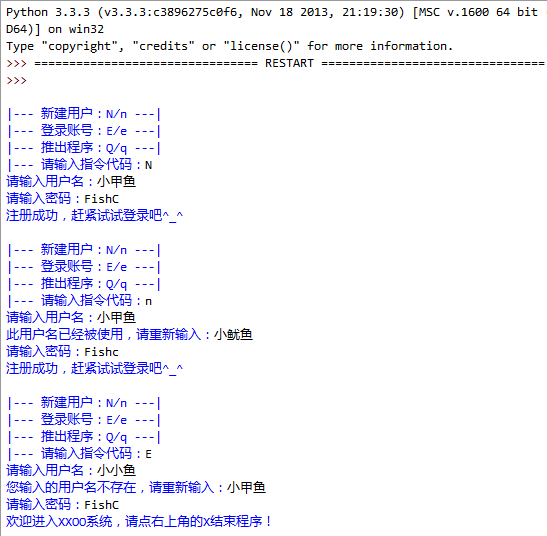
0.嘗試編寫一個用戶登錄程序(這次嘗試將功能封裝成函數),程序實現如圖:
1.請寫下這一節課你學習到的內容:格式不限,回憶並複述是加強記憶的好方式!
回复您的答案即可查看參考答案!
測試題答案:
動動手答案:
本帖隱藏的內容
0.嘗試編寫一個用戶登錄程序(這次嘗試將功能封裝成函數)參考代碼:
1.請寫下這一節課你學習到的內容:格式不限,回憶並複述是加強記憶的好方式!
小甲魚希望你認真對待作業就像你希望小甲魚推出高質量視頻一樣渴望^_^
比序列更加使用的映射類型,Python唯一的一個映射類型就是字典,字典也有一個關鍵符號,就是大括號,跟序列一樣,也可以用dict() 這個工廠函數來創建一個字典,跟序列不一樣的是,如果在序列中試圖為一個不存在的位置去賦值的時候,會報錯,會提示該位置並不存在,但如果在字典中,它會自動創建相應的鍵並添加對應的值。
dict() 是一個工廠函數,實際上是一個類型,調用它會生成一個該類型的實例,此前我們學習了str(),int(),list(),tuple(),這些都是工廠函數(類型),不過在學習類和對象之前,你可以把它們當做普通函數來理解。
1、下面介紹字典的內建方法
fromkeys(....)
用法:dict.fromkeys(S[ ,v]) -> New dict with keys from S and values equal to v(v default to None).
你可以用fromkeys(....)方法創建並返回新的字典,第一個參數S是字典的鍵值,第二個參數v是可選的鍵值對應的值,如果第二個參數不提供的話,就是None。
>>> dict1 = {}
>>> dict1.fromkeys((1, 2, 3))
{1: None, 2: None, 3: None}
>>> dict1
{}
dict1.fromkeys()只是創建新的字典,對原數組無影響,和下面的代碼是一樣的:
dict.fromkeys((1, 2, 3))
{1: None, 2: None, 3: None}
如果給鍵對應的值的話:
>>> dict.fromkeys((1, 2, 3), 'number')
{1: 'number', 2: 'number', 3: 'number'}
但是不要指望分別給鍵對應的值:
>>> dict.fromkeys((1, 2, 3), ('one', 'two', 'three'))
{1: ('one', 'two', 'three'), 2: (' one', 'two', 'three'), 3: ('one', 'two', 'three')}
2、下面介紹訪問字典的幾個方法
keys()、values()、items()
keys()返回字典鍵的引用,values()返回字典值的引用,items()返回字典項的引用
>>> dict1 = {1:'one', 2:'two', 3:'three', 4:'four', 5:'five'}
>>> dict1.keys()
dict_keys([1, 2 , 3, 4, 5])
>>> dict1.values()
dict_values(['one', 'two', 'three', 'four', 'five'])
>>> dict1.items()
dict_items( [(1, 'one'), (2, 'two'), (3, 'three'), (4, 'four'), (5, 'five')])
>>> for eachkey in dict1.keys():
print(eachkey, end = ' ')
1 2 3 4 5
>>> for eachvalue in dict1.values():
print(eachvalue, end = ' ')
one two three four five
>>> for eachitem in dict1.items():
print(eachitem, end = ' ')
(1, 'one') (2, 'two') (3, 'three') (4, 'four') (5, 'five')
當我們試圖訪問字典中不存在的項時,就可能會報錯:
>>> dict1
{1: 'one', 2: 'two', 3: 'three', 4: 'four', 5: 'five'}
>>> dict1[6]
Traceback (most recent call last):
File "<pyshell#56>", line 1, in <module>
dict1[6]
KeyError: 6
這樣的用戶體驗就會不好。
因此使用get()內建函數。
>>> dict1.get(5)
'five'
>>> dict1.get(6)
>>> print(dict1.get(6))
None
也可以在get中為不存在的項輸出相應的提示:
>>> dict1.get(6, '不存在')
'不存在'
>>> dict1.get(5, '不存在')
'five'
>>> dict1
{1: 'one', 2: 'two ', 3: 'three', 4: 'four', 5: 'five'}
如果不知道一個鍵是否在字典中(不能查找值),可以使用成員資格操作符來進行判斷。in 和not in
>>> 6 in dict1
False
>>> 5 in dict1
True
>>> 'five' in dict1
False
清空一個字典,使用clear()方法。
>>> dict1
{1: 'one', 2: 'two', 3: 'three', 4: 'four', 5: 'five'}
>>> dict1.clear()
>>> dict1
{}
clear()會完全清除整個字典,即使該字典有多個名字對應:
>>> a = {1: 'one'}
>>> b = a
>>> b
{1: 'one'}
>>> a.clear()
>>> a
{}
>>> b
{}
copy()拷貝,區別於賦值:
>>> a = {1: 'one', 2: 'two', 3: 'three'}
>>> b = a.copy()
>>> c = a
> >> a
{1: 'one', 2: 'two', 3: 'three'}
>>> b
{1: 'one', 2: 'two', 3: 'three'}
>>> c
{ 1: 'one', 2: 'two', 3: 'three'}
>>> id(a) id()返回地址,可以發現c和a指向同一個字典
2200132871048
>>> id(b)
2200132857800
> >> id(c)
2200132871048
>>> c[4] = 'four'
>>> a
{1: 'one', 2: 'two', 3: 'three', 4: 'four'}
>>> b
{1: 'one', 2: 'two', 3: 'three'}
>>> c
{1: 'one', 2: 'two', 3: 'three', 4: ' four'}
pop()和popitem(),都是彈出字典中的元素。
>>> a = {1: 'one', 2: 'two', 3: 'three', 4: 'four'}
>>> a.pop(2)
'two'
>>> a
{1: ' one', 3: 'three', 4: 'four'}
>>> a = {1: 'one', 2: 'two', 3: 'three', 4: 'four'}
>>> a. popitem()
(1, 'one')
>>> a
{2: 'two', 3: 'three', 4: 'four'}
pop()是彈出對應鍵的項,返回鍵對應的值,popitem()是隨機從字典彈出項,返回鍵和值的元組。
setdefault()
用法與get()類似,只是如果找不到對應的鍵,會自動添加,值默認為None,也可以給值。
>>> a = {1: 'one', 2: 'two', 3: 'three', 4: 'four'}
>>> a.setdefault(2)
'two'
>>> a.setdefault(5 )
>>> a
{1: 'one', 2: 'two', 3: 'three', 4: 'four', 5: None}
>>> a.setdefault(5, 'five')
>>> a
{1: 'one', 2: 'two', 3: 'three', 4: 'four', 5: None}
>>> a.setdefault(6, 'six')
'six'
>>> a
{1: 'one', 2: 'two', 3: 'three', 4: 'four', 5: None, 6: 'six'}
update(),用一個字典或映射關係去更新一個字典。
>>> a
{1: 'one', 2: 'two', 3: 'three', 4: 'four', 5: None, 6: 'six'}
>>> b = {2: 'double' }
>>> a.update(b)
>>> a
{1: 'one', 2: 'double', 3: 'three', 4: 'four', 5: None, 6: 'six'}


0 留言:
發佈留言